🗺️ Table Map
🧻❓ What is RAG?
RAG or in other word (Retrieval-Augmented Generation) is a pipeline that extend the capabilities of any Large Language Model (LLM). It is a simple word for “memory” that an LLM can refer whenever they want response to a prompt. This fascinating feature is not as hard as it seems. Let me teach you briefly how RAG works using my earlier attempt to create smartQA.
⚙️ How RAG works in the code?
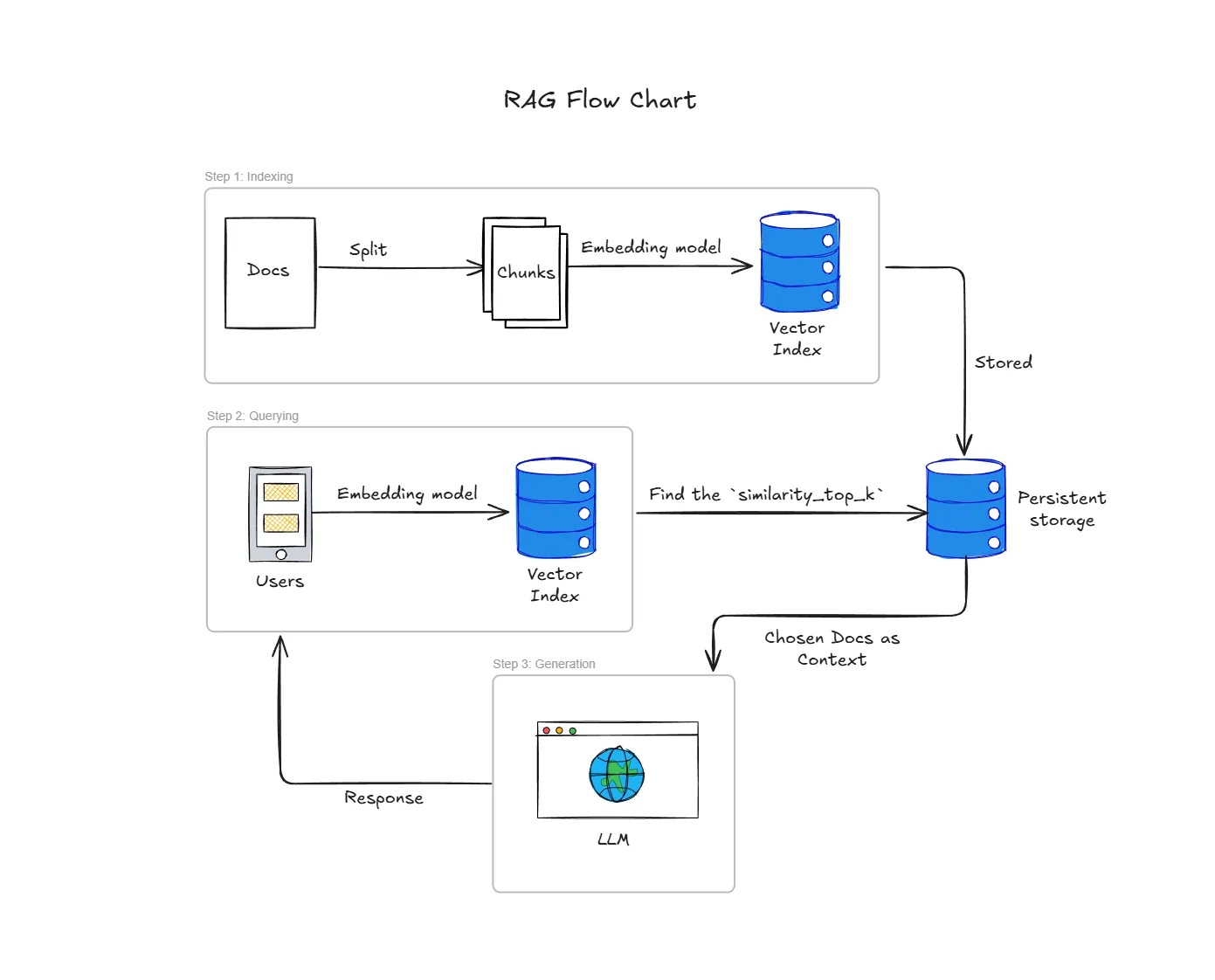
To put it simply, the whole process can be summarized within 3 simple steps (Indexing, Quering, and Generation)
🗃️🔢 STEP 1: Indexing
Indexing is a step where we will prep the data for an efficient retrieval. It is like prepping our ingredients before cooking (at least in our early days of living alone..)
In my use case, I use SimpleDirectoryReader to load all markdowns file that will be used as our external knowledge.
# --- RAG Step 1: Index Management (Load or Create) ---
print("Starting RAG Ingestion Pipeline: Building NEW Index...")

# Load documents
loader = SimpleDirectoryReader(
    input_dir=KNOWLEDGE_DIR,
    required_exts=[".md"],
    recursive=True
)
documents = loader.load_data()
Then, we will convert our markdown files into the numerical representation or also called embedding and stored them. This simple step is crucial as it is much easier for computers to compare similar semantics of words according to the thir distances in multi-dimensional space. Just imagine, that closer word meaning, will be closer to each other literally when convert to vectors.
ollama_llm = OllamaLLM(model="gemma3:4b", request_timeout=120.0)
ollama_embed_model = OllamaEmbedding(model_name="nomic-embed-text", request_timeout=120.0)

# --- load docs ---

# Create the Vector Store Index
index = VectorStoreIndex.from_documents(
    documents,
    embed_model=ollama_embed_model,
)
Since we store the vector inside VectorStoreIndex, we can just save it into our persistent storage aka. ./storage using the script below. Therefore, we would not need to redo everything when we already have done it. Make sense right?
# Persist the index to disk for future use
index.storage_context.persist(persist_dir=PERSIST_DIR)🔍🕵🏻♂️ STEP 2: QUERYING
With the persistent storage exist, half of our works are done. Now let’s move on to the fun part!
Okay, this is simply a query to get user’s prompt. So when user prompt a question, the question itself will be converted into a numerical representation similar as before. Make sure that it uses the same embedding model to make it works^^
# Load the index from the saved directory
    storage_context = StorageContext.from_defaults(persist_dir=PERSIST_DIR)
    index = load_index_from_storage(
        storage_context,
        embed_model=ollama_embed_model # Must pass embed_model to ensure consistency
    )
    print("Index loaded successfully.")

# --- RAG Step 2: Query Engine Construction ---

# 1. Create the Query Engine (This is fast)
query_engine = index.as_query_engine(
    llm=ollama_llm,
    similarity_top_k=3
)
🤖🏭 STEP 3: GENERATION
After we got the user’s prompt, we will want the system to search the Vector Store Index with the closest to the Query’s embedding. The similarity_top_k=3 here means, we will want retrieve the top 3 most relevant docs chunks.
The chunks that we select will then be included in the original user question. You can imagine the prompt to be like this ~
Using the following context, [Retrieved Docs Chunks]. Answer this [User’s prompt].
# --- RAG Step 3: Generate response ---

def ask_rag(question):
    print(f"\n--- Answering Question: {question} ---")

    response = query_engine.query(question)

    print("\n💡 RAG Answer:")
    print(response.response)

    print("\n📚 Source Nodes:")
    for doc in response.source_nodes:
        print(f" - {doc.node.metadata['file_path']} (Score: {doc.score:.4f})")
Finally, we will just simply use LLM to generate the response for us :). (For this use case, we use local LLM: GEMMA3:4b model)
🤔💡 Why use RAG in the first place?
This might baffled you as you might think ~
With my powerful mind, why don’t I just use the good ‘ol “Using the following context, answer this question: [Retrieved Context] Question: [User’s Question]”. It would be so much better and easier
In a small case, it is much easier to just use that approach. Now, imagine you have hundred of markdown files that you would need to manually include in your prompt. That would as easy only if you can find the markdown in one go using ctrl+F. Checkmate! That isn’t as simple as we thought right?
To put it simply, RAG is here to help us find the best context for the job:
- Find the closest vector distance,
- Provide the best semantic context regarding user’s prompt, and
- Give us to have time to relax and drink some “Teh Tarik”